

Ksyusha Bespalova
Product version
Date
3 months ago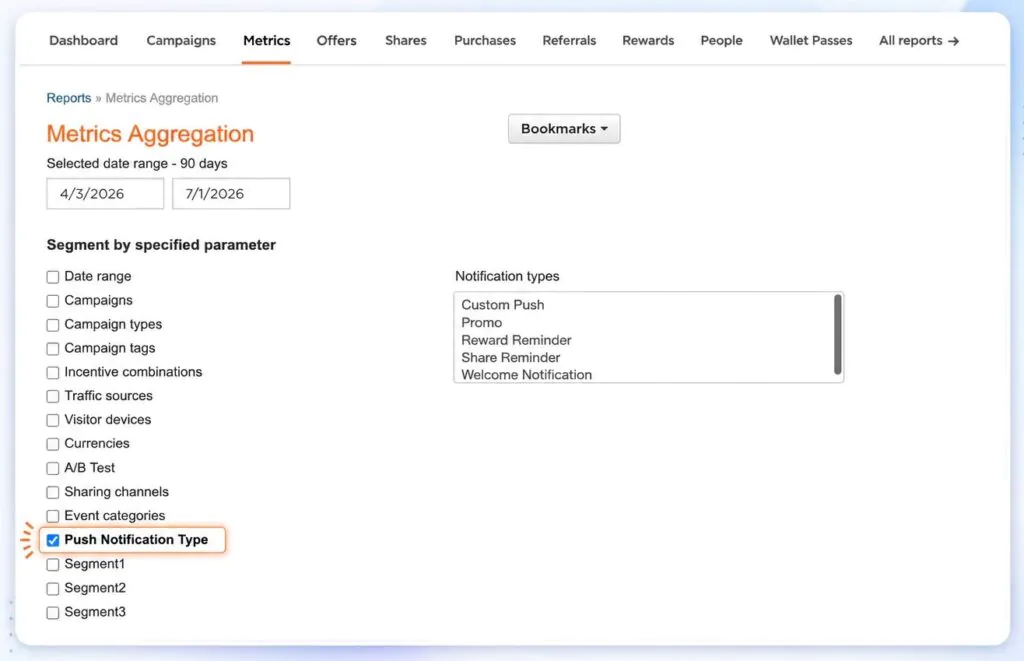
Wallet passes give brands a lightweight way to stay present on a customer’s phone. Referral links, rewards, promotions, and loyalty information can live in one always-available place without requiring a separate app download.
Push notifications make that Wallet experience active. They help brands bring customers back to the pass at the right moment, whether the goal is to remind someone about a reward, highlight a promo, or prompt another referral action.
But when a brand sends multiple Wallet push notification types, total performance is not enough. Teams need to understand which messages are actually contributing to attributed sales and revenue, so they can explain what’s working and refine the next campaign.
We’ve added Wallet push notification type as a filter and segmentation option in the Metrics Aggregation Report, giving teams a clearer way to compare attributed sales and revenue by message type.
Here’s what you can do:
- Filter MAR results by Wallet push notification type when Wallet is enabled.
- Segment Wallet push notification sales metrics to compare performance across notification types.
- See N/A when a push notification type does not apply to Wallet push notification sales.
- Review only the notification types where sales attribution can be enabled.
For brands, this makes Wallet reporting more actionable. Instead of treating push notifications as one blended channel, teams can compare notification types, identify stronger performers, and make better decisions about which messages deserve more focus. It also gives CS a clearer story to bring back to clients when reviewing Wallet performance.
Geofencing notifications are excluded because Apple does not provide the data needed to identify them.
Date
Posted 3 months ago