

Ksyusha Bespalova
Product version
Date
7 months ago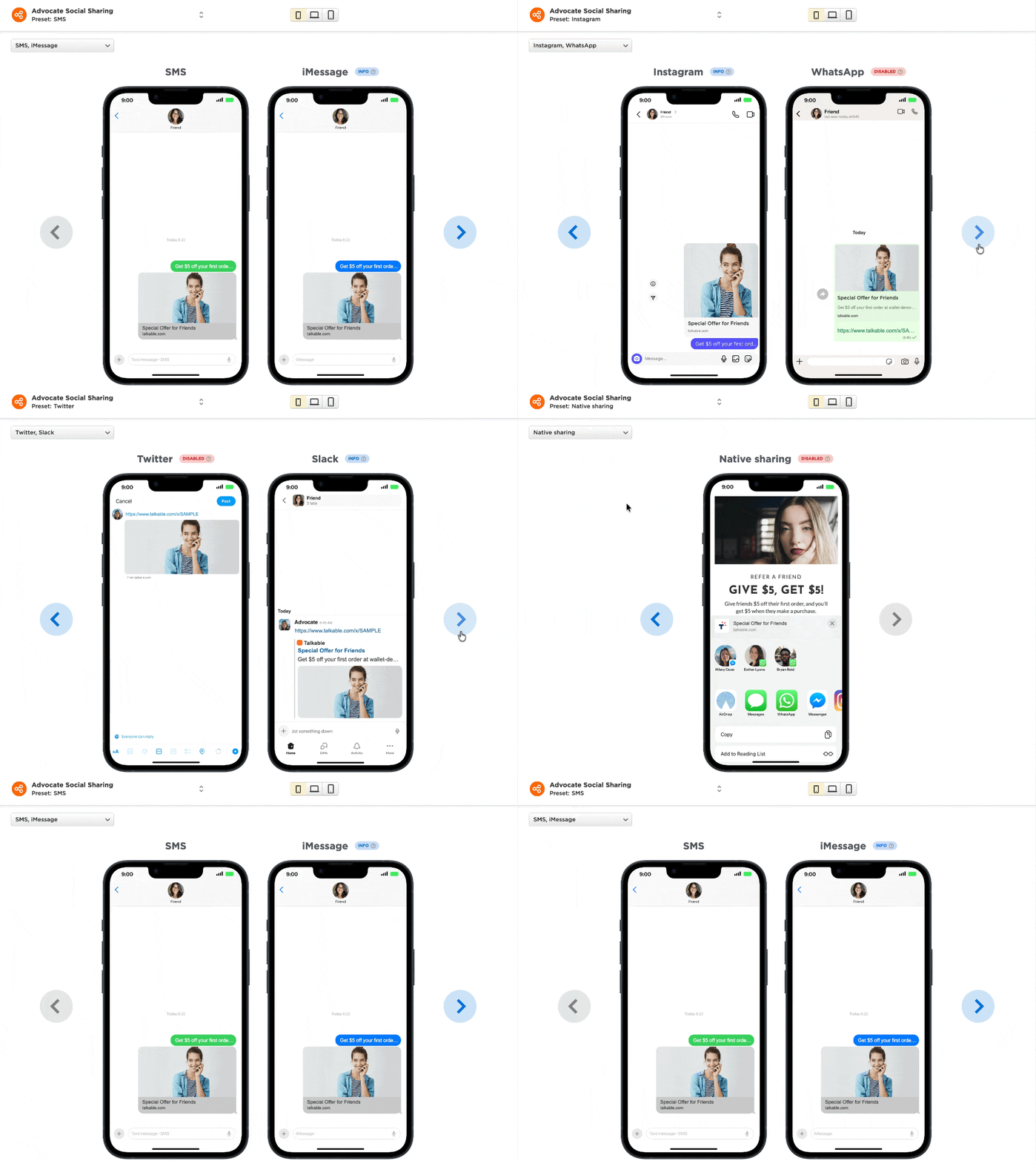
When a customer shares a referral link in iMessage, WhatsApp, or Instagram DM, what does the preview actually look like? Now you can see it before anyone else does.
Until now, setting up share messages in the Easy Editor required guesswork. There was no way to see how a referral link would render in different native messaging apps — making it hard to confidently configure the sharing experience or ensure it looked right across channels.
We’ve added real, styled previews for all major apps directly in the Easy Editor.
You can now preview share links in:
- iMessage — native SMS / messaging card layout
- WhatsApp & Instagram DM — chat-style link cards
- Facebook & Facebook Messenger — social sharing previews
- X (Twitter) & Slack — link unfurl previews
- All previews render your actual OG tag content — title, description, and image
- Each channel respects your localization settings, so you can fine-tune per locale
For brands investing in multi-channel sharing, this removes the guesswork from campaign setup and ensures your referral links make a strong first impression — no matter where they’re shared.
Date
Posted 7 months ago